Duration:
January - March (10 weeks)
A UX Case Study
Blender Add-on Menu - Interactivity & Discoverability
A redesign where we made it more easily accessible as a pie menu,
while also keeping the functionality similar for beginners and professionals alike


Challenge
While Blender is a common 3D modeling program commonly used by beginners and those in the industry, there are some aspects that professionals utilize that can be improved.
My Role
Industry outreach, user research, UI redesign, prototyping
Outcome
A Figma prototype that changes the menu to be more beginner-friendly, be more visible, and easier to organize while also feeling more dynamic.
Team Memebers
Taylor Wong
Ashley Nguyen
Alexander Escobar
Tools for better collaboration could improve workflow
Challenges with client communication
Blender’s open-source nature provided useful plugins
Heavy reliance on extensions to enhance workflow
User Research Findings
The transition from Industrial Designer to Concept Artist involved a steep learning curve, especially with tools like the Adobe Suite. Jose relied heavily on extensions and plugins to improve his workflow, with Blender’s open-source nature offering useful plugins to address software limitations. Challenges in client communication, such as vague requests and tight deadlines, were also noted and could be alleviated with better collaboration tools.
We decided to focus on Blender as its add-ons feature is quite important to the professional workflow, yet also needs the most work.
Key Insights

Some Interview 1 Questions
Walk us through your creation process
What tools, programs software do you use?
What do you wish was more convienient?
Biography
Started as an industrial designer in trade show industry
Joined the Art Director’s Guild
Works as a concept artist, using both 2D and 3D
Background & User Research
For our case study, we first interviewed two stakeholders: Jose Itturgia and Diego Velasco. While Professor Velasco was important for finding what issues to focus on in terms of 3D modeling programs, I will focus on Jose Itturgia as he is an industry professional that uses Blender.
As all we knew was that we wanted to focus on 3D programs, our first interview was just about discovering possible issues in an industry professional workflow.
Initial Problem Statement
Many 3D designers need an intuitive interface for using 3D modeling software due to the sheer complexity of the programs and usage of many extensions of plug-ins in order to streamline the overall design process and stabilizing workflow.

Goals
Improve customization and personalization
Create a more intuitive interface
Provide tutorials or documentation
Personas
Based on our user interviews, we create two personas that reflect current users of Blender and their pain points.
Philip
A digital-media major at a local university that creates short films as a hobby

Mariel
A freelance concept artist with a few years of experience with Blender


UX Flows
These workflows allow us to better visualize the overall flow of our design and easily pinpoint the possible interactions as users come to use our product. We separated the workflows into initial user workflow for Blender and then showed our own anticipated workflow for our redesign so that we can better understand how our product would change the program.
Pie menu is faster and more reliable to pick from since the selection depends on direction instead of distance
First workflow shows integration of pie menu into Blender's current workflow
Second workflow demonstrates configuration/setup of the pie menu
Streamlines access to preferred add-ons during 3D modeling
Limited number of add-ons can be included; users must prioritize


Version A - Pie Menu
Version B - VS Code inspired
Workflow inspired by VSCode due to its open-source nature and customizable plug-ins
Current add-ons manager is hidden in multiple menus, making it hard to find and access
Redesign focuses on speed and better information availability
Adjusted entry point to a separate button that opens an add-on manager interface
Default display shows installed add-ons and those needing updates.
Add-ons listed by name with a short description and expandable settings
Low-Fidelity Prototypes
Blender’s complex UI makes it difficult for users to navigate and use its features, especially when it comes to managing add-ons. User research revealed that the add-on feature is unorganized and hard to use. Our prototype aims to address these issues by redesigning the add-on menus to be more streamlined, improving the overall workflow for 3D designers.
We created two versions of our initial design, one being a pie menu (inspired by Rhino) and one that comes out from the side (inspired by VS Code).
User Testing
To find potential problems with our redesign, we conducted two user interviews where we asked some professional 3D modelers (one of them being our original interviewee). We did A/B testing where we first explained what we did for each prototype, then let them explore it on their own.
Findings
From our interviews, we found that both of our redesigns were well-received by our interviewees. While our interviewees expressed that — from their experience — some people would prefer the traditional menu style, the majority opinion seems to be that they prefer the pie menu as it is the more quick and simple solution. From our point of view, it seems that 3D designers tend to prioritize dynamic, easy-to-access tools as it would be convenient to use while in the middle of working.
In addition, since the Blender UI is already very complex, straightforward processes would be more beneficial to the user workflow. Thus, a more streamlined design would be better to implement. However, because the VS Code inspired prototype offers more versatility in terms of functionality — such as updating add-ons — we tried incorporating these features into our pie menu.


High-Fidelity Prototype
After user testing, the feedback mainly focused on minor visual improvements to the UI, like font, colors, and size, which we adjusted to improve consistency. Users generally liked the layout and didn’t have major concerns about the design composition. We also added more functionality, such as section highlighting and notifications for add-on updates.
The most significant feedback was on selecting screens for the final prototype. For the pie menu settings, users preferred the transparent page that opens to the side, as it allowed them to see the workspace and understand changes in real-time. For the add-on configuration menu, users favored the tie fighter menu, which we then focused on improving. Lastly, we added an onboarding screen that asks users about their preferences, then recommends add-ons based on their needs, helping them find tools to improve their workflow.

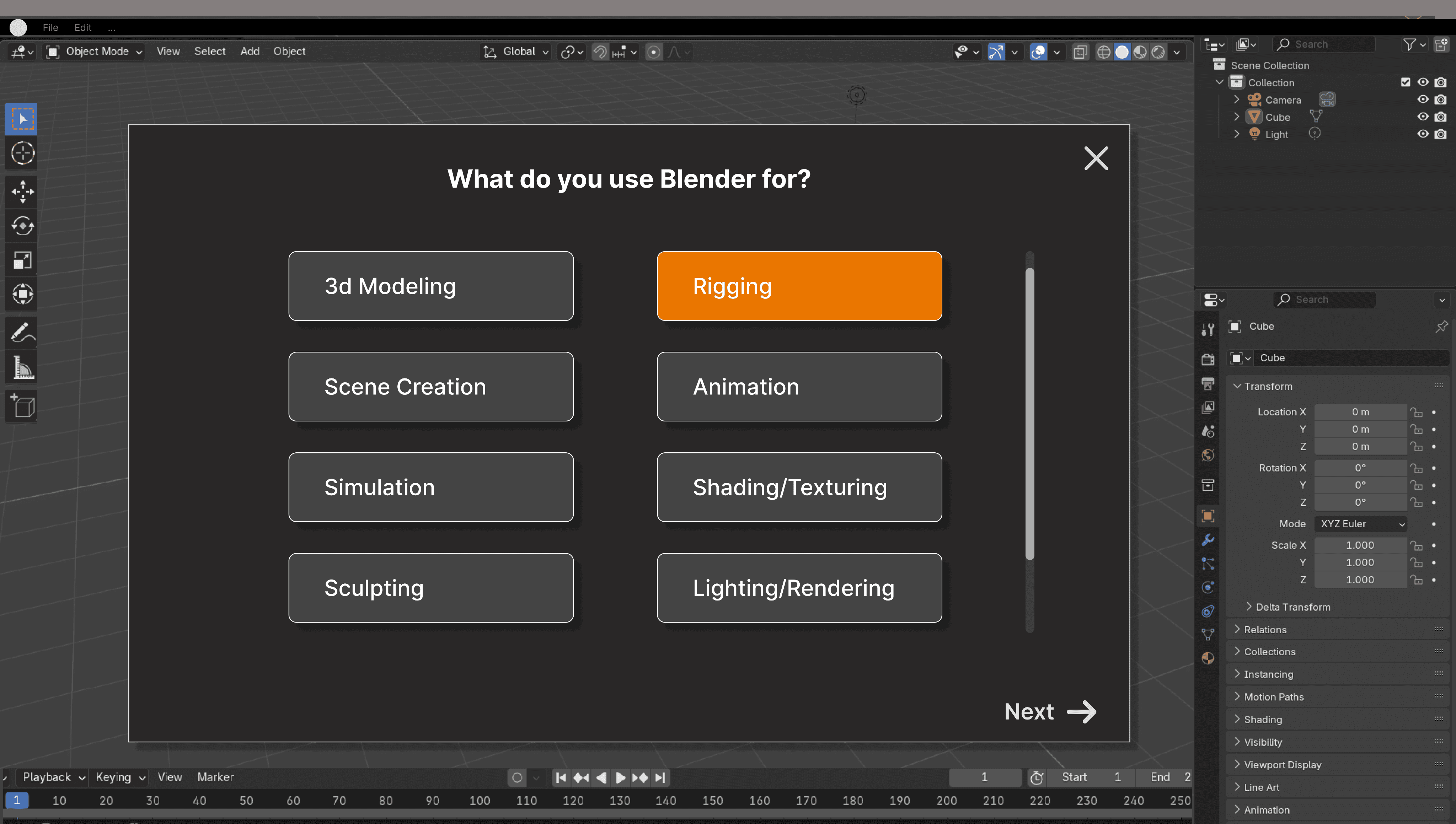
Onboarding where user picks which functions they use the most
User is given suggested add-ons based on their choices


Screen showing which shortcut to press to display the pie menu
The pie menu in front of the viewport workspace


The additional popup menus on the side after clicking the + button
The settings for changing the pie menu
Key Takeaways
What I learned from doing all this is how much thought goes into what seems like a simple menu design. In so many of the interfaces we use in our daily lives, we don’t notice how much effort it must’ve taken to get to that iteration.
Having real professionals have some input into the design process also feels so fulfilling compared to other projects I’ve done since it feels like what I’m doing has an actual impact. By analyzing a piece of software that already exists out there, it’s like we’re getting a taste of what the professional world is like.
As someone who personally wants to know more about 3D modeling as well, I’m glad I had the chance to study an aspect of the program itself and will continue to use what I learned in my future projects. Thank you!