Duration:
January - March (10 weeks)
A UX Case Study
Rook Lift Chess Academy
A new website for a California local business

How did I...
Design a website for both desktop and mobile view while also taking the client’s vision into account
My Role
User research, competitive analysis, prototyping


Find class enrollment page
Information about lessons and skills gained
Read testimonials
Sign up for events
See upcoming events and tournaments
Know who the coaches are
Contact faculty for questions
Look for private tutoring section
Wants to look for the date of specific lessons
User Research
In order to get a better look for the demographic that may view our website, we surveyed 9 people and organized them into three different categories: a current student, parent of the student, and a prospective student. We created three different personas based on them to ensure that we meet the needs of all types of users for the website.
Current Student
Parent of Enrolled Student
Prospective Student
Some Priorities
Organize course and business structure
Improve upon branding (kid-friendly or professional?)
Website pages heirarchy
Some Survey Questions
How would you describe your target customers?
What makes people choose your business over othrs?
What are you looking for in your ideal site?
Background
We found our client, Wilfredo Sabobo, through a mutual connection of a team member. He’s the owner and main coach of Rook Lift Chess Academy (located in Palo Alto) and had no website to act as an information center for his business. We offered to create one for him based on the existing marketing materials he’s previously used.
In order to get an idea of what our client wanted for the website, we first surveyed him about his chess business. Then we created a priority list of what potential features he wanted in his site.
Features like booking tournaments can be in event calender
Navigation menu can be the standard upper bar (minimize things you need to click)
Use email or contact form only (phone calls are disorganized)
Include online classes, in-person classes, and private lessons
Competitive Analysis
We did an in-depth analysis of the websites from other chess academies online in order to see what they did well. We focused on branding (logo, color palette, etc.), key functionalities, and navigation methods.
Key Insights
Wireframing
We created mobile and desktop low-fidelity prototypes and chose to focus on 5 main pages: Home, Classes, Events, About, and Contact.
Below is the site architecture diagram that would form the navigation structure of the prototype itself.
As some functionalities of a desktop site are not able to be viewed the same as on mobile, there are differing designs for each.


Users can click on the “Enroll Classes” button in the middle and be taken to the Classes page
At the footer of the page, “Contact Us” redirects to the Contact form page
Sign ups or booking for events are on the right of each row
Pressing “More Info” presents a page with more information
A prospective student can click the “Book Now” button to enroll in classes based on their skill level
Hierarchy: General Information/Our Mission, School info. and then Coach info.
Coaches are listed out with pictures on the left side. Info. includes general description, levels, and skill set.
Desktop
Clicking on one of the images in the gallery enlarges it so the user can view it easier
Home
Events Schedule
About Us
Class Offerings
The testimonials from parents/students are scrollable to view more
If the user sees an event they might want to know more about, they can click the “More Info” button to learn more
“Enroll” Buttons to book classes
“Enroll” Buttons to book private tutoring sessions
Users can read about the chess coaches if they wish to gauge the instruction team’s ability.


Mobile


User Testing
We conducted user testing with another group by assigning them simple tasks one would do on the site as well as general questions before, during, and after testing. Some questions included, “Was it clear which classes were available?” and “Was the searching and booking process clear?”
Findings
Our users felt that the format was overall clear and text was easy to read, and all necessary features of the site were available.
For improvements, we could improve on clearer description that all skill levels are accepted adding a section for people unsure about their skill level to be evaluated by a coach. There could also be features such as an external link to the tournaments hosted by another academy and including a pop-up confirmation on the website after sending a question form to ensure that it was sent.
High-Fidelity Prototype
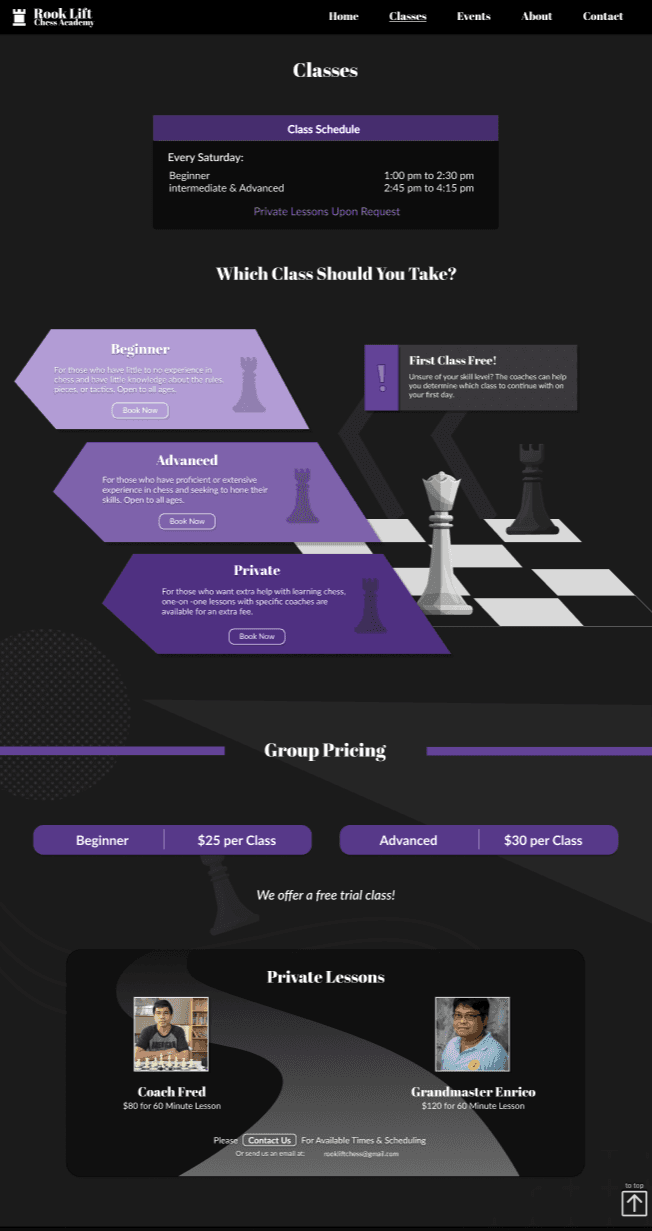
After user testing, we included most of the feedback we received in the final design of the website.


Mobile
Desktop



Key Takeaways
What I learned from this specific project is in the real world, we aren’t going entirely off of what we envision for the design, but what the client wants as well. It’s important to know that if the client themselves aren’t well versed in design, it’s hard for them to put what they want into words. It’s up to us as designers to help them see their vision. At all points during development, we always were in contact with the business owner to ensure that they received the best website possible.